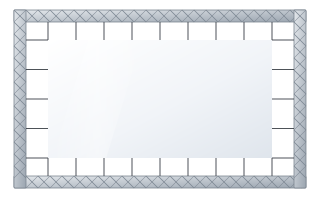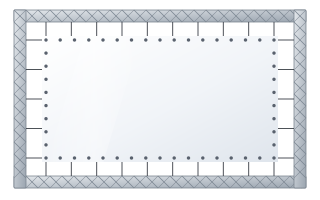
- Easy and Eyelet are made-to-measure projection surfaces with no case and no frame of their own – they are attached with elastic cords to truss or a structure.
- Easy has steel rods in pockets on all four sides, Eyelet has reinforced eyelets around the entire perimeter.
- Both versions are available 2–10 m wide and in aspect ratios from 1:1 to 2.40:1.
- You adjust fabric tension with the length of the cords: accessory sets include 20, 35 and 50 cm cords.
- For rental, the crease-resistant Vision Fold 2 and Vision Fold Rear 2 fabrics work best.
What quick-assembly surfaces are
A conventional screen has a case with a roller or a rigid frame. A quick-assembly surface is projection fabric alone, made to measure and prepared for fixing to a structure you already have: aluminium truss, a stage frame or a support rig. The manufacturer designed both variants mainly for rental companies and event producers, but they also work in permanent installations where the screen needs to be very large and a case is out of the question.
There are two models: Easy and Eyelet. You will find both in the quick-assembly projection surfaces category. They differ in how the fabric is fixed, which affects the evenness of tension, speed of assembly and the look of the edges.
Easy Surface – rods in pockets and elastic cords
In the Easy version, pockets are sewn along all four sides of the fabric, and steel rods slide into them. Elastic cords hook onto the rods, and the other end of each cord is attached to the truss. The fabric has no traditional metal eyelets – the tensioning force is spread along the rod rather than concentrated at individual points of the material.
- Even tension – the rod stiffens the edge, so the fabric scallops less between fixing points.
- Many fixing points – cords can be placed close together around the whole perimeter.
- Transport – the bottom rod is always split into two parts; the other rods can be one-piece. For large surfaces, check that the long rods will fit in your vehicle and storage.
Eyelet Surface – reinforced eyelets around the perimeter
In the Eyelet version the fabric has reinforced eyelets spaced around the entire perimeter. Elastic cords are threaded through the eyelets and attached to the truss. There are no rods, so the kit is lighter and smaller to transport, and preparation comes down to laying out the fabric and hooking up the cords.
Because the tensioning force acts at individual points, the flatness of the surface depends on how evenly you tension all the cords. With careful installation the result is good, but it takes a little more attention than the rod version.
Easy or Eyelet – comparison
| Feature | Easy | Eyelet |
|---|---|---|
| Edge fixing | steel rods in pockets on 4 sides | reinforced eyelets around the entire perimeter |
| Connection to truss | elastic cords hooked onto the rods | elastic cords through the eyelets |
| Evenness of tension | very good, the rod straightens the edge | good, depends on even cord tension |
| Transport | fabric + rods (bottom rod split in 2 parts) | fabric only, smallest volume |
| Width | 2000–16,000 mm, made to measure | |
| Aspect ratios | 1:1, 4:3, 16:10, 16:9, 1.89:1, 2.35:1, 2.37:1, 2.39:1, 2.40:1 | |
| Typical use | permanent or frequent installations where flatness matters | rental, short jobs, fast set-up and strike |
Elastic cords and tension adjustment
In both versions, fabric tension is adjusted via the length of the elastic cords. A shorter cord at the same distance from the truss stretches more and pulls the material tighter; a longer one less so. The manufacturer specifies 20 cm cords as standard, and the accessories for these surfaces include sets of 20 cords in lengths of 20, 35 and 50 cm.
- Keep an even gap between the fabric and the truss around the whole perimeter – then all the cords work in a similar way.
- Fix the corners first, then the middle of each side, and finally the intermediate points. This stops the fabric being pulled to one side.
- When planning the structure, leave room around the surface for the cords – the internal dimension of the truss frame must be larger than the fabric by the gap needed for tensioning.
Maximum width depends on the aspect ratio
In the configurator you can order the Easy surface in maximum widths that depend on the aspect ratio. The taller the image relative to its width, the smaller the available width.
| Aspect ratio | Maximum Easy fabric width |
|---|---|
| 21:9 | 10 m |
| 16:9 | 10 m |
| 16:10 | 10 m |
| 4:3 | 9 m |
| 1:1 | 7 m |
Custom aspect ratios are also possible. Match the image size to the distance of the back row – you will find calculation methods in our guide how to choose screen size.
Which fabric to choose for truss
Both surfaces are available with a wide range of fabrics. The choice depends on where the projector shines from, whether there are speakers behind the screen and how often the fabric is folded.
- Vision Fold 2 – white, elastic and crease-resistant. The first choice for rental companies, because the fabric stays smooth after being folded and unfolded many times.
- Vision Fold Rear 2 – a grey rear-projection fabric (gain 0.6), also designed for rental. The projector stands behind the screen, so there are no presenter shadows on stage and no cables in front of the audience.
- Vision Rear DB – a fabric for front or rear projection (gain 0.6 at the front and 0.8 at the rear); for rear projection, simply flip the image in the projector. More in our guide to rear projection.
- Vision Acoustik and Vision Macro Acoustik – perforated fabrics for when there are speakers behind the screen; the manufacturer aims Macro Acoustik, with 1.3 mm holes, at cinemas, theatres and very large venues. The principles are described in our guide to acoustic screens.
- Vision White and Reference White 2 – classic front projection in installations where the fabric is not folded often.
Differences in fabric brightness are described by the gain factor. On large stages with strong stage lighting, a projector with plenty of brightness headroom will help.
What to watch out for when mounting on truss
- Truss and its loads – permissible loads for the structure are specified by its manufacturer. Stage structures should be assembled by people experienced in this field.
- Frame geometry – the truss must form a rectangle with equal diagonals. A crooked frame means a crooked image that tensioning cannot fix.
- Cleanliness – lay the fabric out on clean sheeting or a cover, not on the hall floor. Shoe marks and grease show on the image.
- Folding – after an event, fold the fabric in line with the manufacturer's recommendations and store it in a dry place. You will find tips in our guide to screen cleaning and maintenance.
Easy, Eyelet or the folding FramePro frame
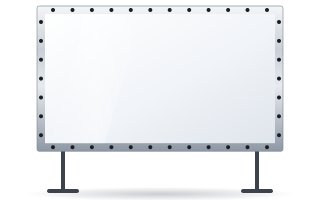
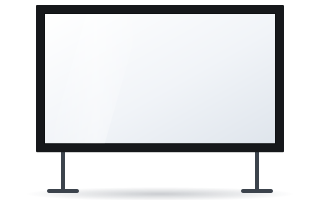
If you have no truss and do not want to build one, consider the folding FramePro frame – a ready-made screen with its own aluminium frame, split for transport, that stands on stands or hangs on a wall. We describe the differences between versions in our guide FramePro – FB, RB, FE, RE versions. Easy and Eyelet win where you need a greater width than folding frames offer, or where the structure is already part of the stage. We write more about event equipment in our guide to screens for events and rental.
Checklist before ordering
- Image width and aspect ratio, and the internal dimension of the structure the fabric will hang on.
- Fixing method: rods in pockets (Easy) or eyelets (Eyelet).
- Front projection, rear projection or both; whether there will be speakers behind the screen.
- How often the fabric will be folded – for rental, choose Fold fabrics.
- Length and number of elastic cords.
You can check the price of a specific configuration in the configurator for business & institutions. ABC Prezentacji also provides advice on preparing the site and ships at no extra transport cost – get in touch with us.
Frequently asked questions
How does Easy differ from Eyelet?
Easy has steel rods slid into pockets on all four sides of the fabric, onto which elastic cords are hooked. Eyelet has reinforced eyelets around the perimeter, through which the cords are threaded. Easy gives more even edge tension, while Eyelet is lighter and smaller to transport.
How large can an Easy surface be?
The width ranges from 2 to 10 m. The maximum width depends on the aspect ratio: up to 10 m for 16:10, 16:9 and cinema formats, up to 9 m for 4:3 and up to 7 m for 1:1.
How do I adjust fabric tension on truss?
With the length of the elastic cords and the gap between the fabric and the structure. Accessory sets of 20 cords are available in lengths of 20, 35 and 50 cm.
Which fabric is best for rental?
Vision Fold 2 for front projection and Vision Fold Rear 2 for rear projection. Both are designed for rental and resist creasing with frequent folding.
Can an Easy or Eyelet surface be installed permanently?
Yes. Although the manufacturer aims them mainly at rental and events, they also work in permanent installations on a rigid structure, especially when the image needs to be very wide.